Generated text is recognizable from the first paragraph: symmetrical structures, lists of three, introductory phrases like “in today’s fast-paced world,” and conclusions that conclude nothing. The problem isn’t that AI writes poorly—the problem is that it writes identically. For editorial teams and content operations producing dozens of pieces a week, this uniformity becomes a systemic risk: readers and algorithms learn to recognize patterns, the brand voice gets diluted, and materials lose citability in AI answer engines that prefer unique phrasing.
The good news: most of the robotic feel of AI text is fixable through systematic editing. Not a one-off “make it pretty” tweak, but the consistent application of techniques that can be turned into a repeatable workflow. This practical guide covers specific techniques for text and video scripts, the order of application, and ways to verify the result.
Why AI Text Sounds Unnatural: Structural Reasons
The robotic feel of AI text is not an accident but a consequence of language model architecture. LLMs predict the next token based on a probability distribution, and this distribution gravitates toward the most frequent constructions. The result is text that is statistically “correct” but lacks individuality.
Key markers of unnaturalness:
- Symmetrical lists. AI loves groups of three items of the same length. Real authors don’t write like this—they give two short ones and one expanded, or one item with an example and two without.
- Uniform sentence rhythm. All sentences are roughly the same length—15–20 words. Living text alternates short and long.
- Redundant introductory constructions. “It is important to note,” “it should be emphasized,” “it is necessary to consider”—filler phrases that carry no meaning.
- Structural parallelism. Every paragraph is built on the same scheme: thesis → explanation → example. This makes the text predictable.
- Lack of authorial voice. AI strives for neutrality, so the text sounds like Wikipedia, not like an expert piece.
Three Stages of Naturalization: Tone, Rhythm, Context
Editing AI text works like a pipeline. If you apply techniques haphazardly, the result will be worse than from consistently passing through the three stages.
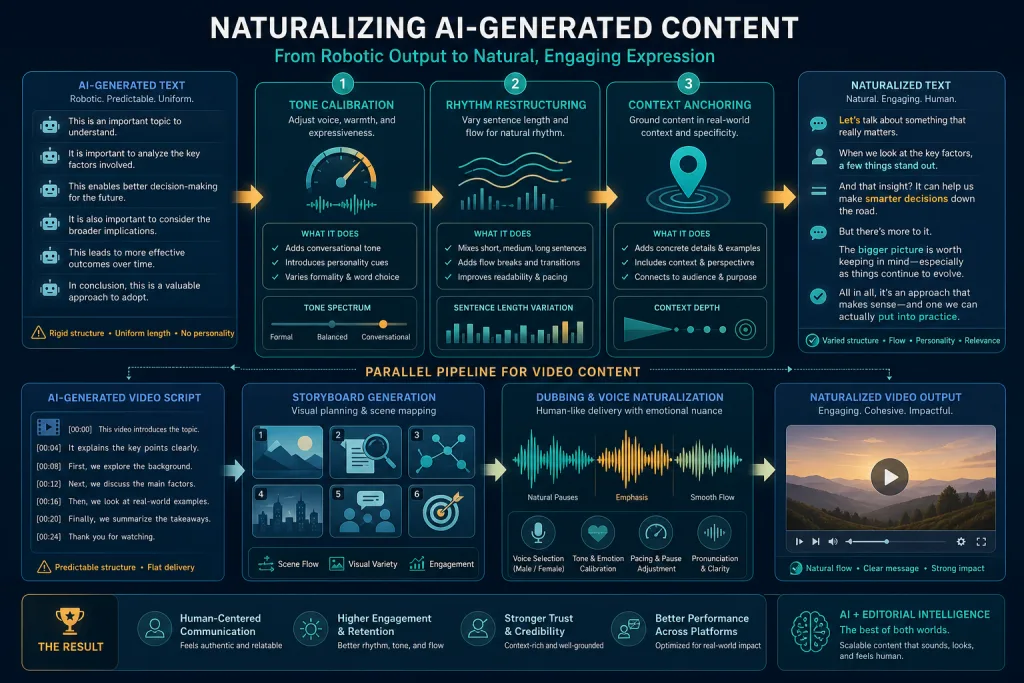
Stage 1: Tone Calibration
Tone isn’t “make it friendlier.” Tone is matching the brand voice and the context of the material. For editorial teams, this means that before editing begins, a benchmark voice must be established: examples of 3–5 pieces that the team considers exemplary.
A practical technique is tone-matching via few-shot prompting. Instead of asking AI to “rewrite more naturally,” upload 2–3 paragraphs of benchmark text and ask the model to analyze its style: sentence length, pronoun usage, level of formality, types of argumentation. Then ask it to apply this profile to the generated text.
For video scripts, tone calibration is more critical than for articles. A script that sounds robotic in voiceover kills retention in the first 10 seconds. Check the script by reading it aloud: if you stumble or automatically change words while reading, the text is unnatural.
Stage 2: Rhythm Restructuring
Rhythm is the variability of sentence and paragraph length. AI text usually has a flat rhythm: all sentences are medium-length, all paragraphs have 3–4 sentences. Living text breathes.
Editing techniques:
- Find the longest sentence in a paragraph and split it into two.
- Find the shortest paragraph and merge it with a neighbor—or, conversely, isolate a single sentence into its own paragraph for emphasis.
- Remove 30–40% of introductory words. Keep only those that actually create a logical transition.
- Check if the text has at least one sentence shorter than 8 words. If not, the text is too uniform.
For video scripts, rhythm is measured differently: in seconds of speaking. The ideal rhythm for YouTube is alternating 5–10-second phrases with one 15–20-second phrase. For Shorts—phrases of 3–7 seconds. AI scripts often generate phrases of the same duration, which sounds monotonous in voiceover.
Stage 3: Context Anchoring
This is the most important and most difficult stage. AI text exists in a vacuum—it is not tied to your experience, your data, your audience. Context anchoring is the introduction of specifics into the text that make it yours.
Anchoring techniques:
- Primary data. Insert results from your own research, numbers from your analytics, quotes from real clients. AI cannot generate this—this is your unique source.
- References to previous materials. “As we wrote in our breakdown of MCP connectors…”—this creates a fabric that AI does not produce.
- Local examples. Instead of “companies use AI”—”an editorial team of 12 people producing 40 pieces a week uses AI to…”
- Limitations and nuances. AI strives for universality. A real expert always adds “but this only works if…” or “in our case, this didn’t work because…”
Editing Workflow: From Draft to Publication
Systematic editing of AI text requires a process, not inspiration. Here is a workflow that can be implemented in an editorial team of any size.
Step 1: Generation with set constraints. Don’t ask AI to “write an article.” Set constraints: “write a 200-word section, use sentences of varying lengths (from 5 to 30 words), don’t use introductory phrases like ‘it is important to note’ and ‘it should be considered’, start with a specific example, not a generalization.” Constraints at the generation stage reduce editing time by 40–50%.
Step 2: Passing the three stages. Tone → rhythm → context. Each stage can be partially automated with a prompt, but the final check is human. At the tone stage, use a few-shot prompt with benchmarks. At the rhythm stage—ask AI to analyze the distribution of sentence lengths and suggest break points. At the context stage—manual work, AI is no helper here.
Step 3: Multimodal verification. For video scripts—mandatory check via TTS voiceover. Run the script through any high-quality text-to-speech engine and listen. Rhythm and tone problems invisible on paper become obvious in audio. For text—check by reading the first 200 words aloud.
Step 4: Pattern check. Run the text through an AI pattern detector (not an AI content detector—these are different things). A pattern detector looks not for “did AI write this,” but “does it sound like AI”: symmetrical lists, uniform rhythm, filler phrases. If patterns remain—return to stage 2.
Specifics for Video Scripts
Video scripts are a separate class of AI content with their own problems. An article can be “robotic,” but the reader will still finish it. A script that sounds unnatural loses the viewer in 15 seconds.
Typical problems with AI scripts:
- Too dense information. AI tries to cram maximum facts into minimum time. Real successful scripts leave pauses, questions, moments to process.
- Lack of conversational markers. Live speech contains “well,” “like,” “actually,” unfinished thoughts, self-interruptions. AI scripts don’t do this.
- Universal hook. “In this video, we will talk about…”—this is not a hook, it’s an announcement. A hook should be specific: “In the last 30 days, we generated 200 videos and here is what we learned.”
- Voiceover vs. on-camera text. AI doesn’t distinguish what will be said off-screen and what will be said on-screen. For voiceover, more complex constructions are acceptable; for on-camera, a conversational register is needed.
A practical technique for video teams: generate the script in two passes. First pass—structure and facts. Second pass—prompt “rewrite this script for spoken language: cut sentences to 12 words, add conversational markers, replace complex terms with simple analogies, add 2–3 rhetorical questions.”
Multimodal Verification: Text + Audio + Video
Modern AI tools allow checking content naturalness not only at the text level, but also at the audio and video level. This is especially important for teams producing content in multiple formats.
For text: in addition to reading aloud, use AI readability analysis. Prompt: “analyze this text for naturalness on a scale of 1 to 10. Evaluate: sentence length variability, presence of filler phrases, list symmetry, presence of authorial voice. Give specific recommendations for each point.”
For audio: TTS voiceover followed by listening. Pay attention to places where the voice “stumbles”—usually these are long sentences or paragraph junctions.
For video: if the script will be voiced by AI dubbing, check how the text fits the timing. AI video generators often create 3–5 second scenes, and the script must adapt to this rhythm, not vice versa.
Integration into Content Operations
Naturalizing AI text is not a one-off task, but a systemic process. For it to work at scale, three elements are needed.
Benchmark library. A set of 10–20 text fragments that the team considers exemplary in style. These fragments are used as few-shot examples in prompts and as a benchmark for editorial review.
Editing checklist. A standardized list of checks that an editor goes through for each piece. Not “make it good,” but “check for short sentences, remove filler phrases, add primary data, check rhythm by reading aloud.”
Naturalness metric. Simple scoring: the editor rates the piece from 1 to 5 on the criterion “does it sound human-written.” If the score is below 4, the piece goes back for revision. Over time, the team calibrates, and the average score grows.
Checklist: Verifying AI Text Naturalness
- The text has at least one sentence shorter than 8 words and at least one longer than 25 words
- All introductory filler phrases have been removed: “it is important to note,” “it should be considered,” “it is necessary to emphasize”
- Lists are not symmetrical: items are of different lengths and with varying degrees of detail
- The text contains primary data, references to previous materials, or local examples
- The first 200 words were read aloud without stumbling
- For video scripts: TTS voiceover was listened to, the rhythm of phrases is uneven
- The text passed the AI pattern check: no uniform rhythm and universal generalizations
Mistakes Editorial Teams Make
The first and most frequent mistake is trying to fix everything with one prompt. “Rewrite this text to sound natural”—this doesn’t work. AI doesn’t know what you consider natural. Naturalness is not a property of text; it’s a match to context: brand voice, audience expectations, publication format.
The second mistake is over-editing. When an editor sees AI text, they often rewrite 80% of the material. If you need to rewrite 80%—it’s easier to write from scratch. The goal of editing is to keep 60–70% of the generated text and transform the 30–40% that sounds unnatural.
The third mistake is ignoring video scripts. Teams that actively use AI for text often treat scripts as “text that will then be voiced.” But a script is not text. It is spoken language written on paper, and the rules of naturalness for it are different.
Measurable Results
How do you know if the editing is working? Three metrics to track.
Editing time. When implementing a systematic workflow, the time to edit one piece should drop from 5–6 hours (typical for AI editors) to 2–3 hours. If the time isn’t dropping—the workflow isn’t working.
Video retention. For video scripts that have undergone naturalization, retention in the first 30 seconds should increase by 10–15% compared to “raw” AI scripts. This is measured in YouTube Analytics or the platform’s analytics.
Citability in AI answer engines. Natural, original text with primary data is cited in ChatGPT, Perplexity, and Gemini more often than template AI content. Track brand mentions in AI answers for key queries.
FAQ
Can AI text editing be fully automated?
No. The stages of tone calibration and rhythm restructuring can be partially automated with prompts, but context anchoring—introducing primary data, references, and authorial voice—requires a human editor. The goal of automation is to reduce routine, not to replace editorial judgment.
What prompts work best for naturalization?
Few-shot prompts with benchmark examples work better than instructions like “write more naturally.” Upload 2–3 fragments of your best text, ask AI to analyze the style, then apply the found profile to the generated text. Specific constraints (sentence length, ban on filler phrases) work better than abstract requests.
How is editing video scripts different from editing articles?
A script is spoken language, not written text. The criteria are different: phrases up to 12 words for on-camera text, conversational markers, rhetorical questions, pauses. A mandatory check is TTS voiceover and listening. For Shorts, phrases should be even shorter—3–7 seconds of speaking.
How do you measure if the text has become “more natural”?
Three ways: reading the first 200 words aloud (if you don’t stumble—it’s good), editor scoring from 1 to 5, and checking via AI pattern analysis (symmetry, rhythm, filler phrases). For video—retention in the first 30 seconds after implementing naturalized scripts.
Should you use AI content detectors for verification?
AI content detectors and AI pattern detectors are different tools. Content detectors look for “did AI write this” and are often wrong. Pattern detectors look for specific markers of robotic feel: uniform rhythm, symmetrical lists, filler phrases. The latter are more useful for editing because they provide specific points for correction.
Conclusion
The naturalness of AI text is not magic or talent. It is a systemic process of three stages: tone calibration against benchmarks, rhythm restructuring through sentence length variability, and context anchoring through primary data and authorial voice. For video scripts, a mandatory check via TTS voiceover is added. Implemented as a repeatable workflow with a benchmark library, checklist, and naturalness metric, this process cuts editing time in half and increases content retention and citability. The main mistake is trying to fix everything with one prompt. The main victory is turning editing into an operating system, not individual mastery.