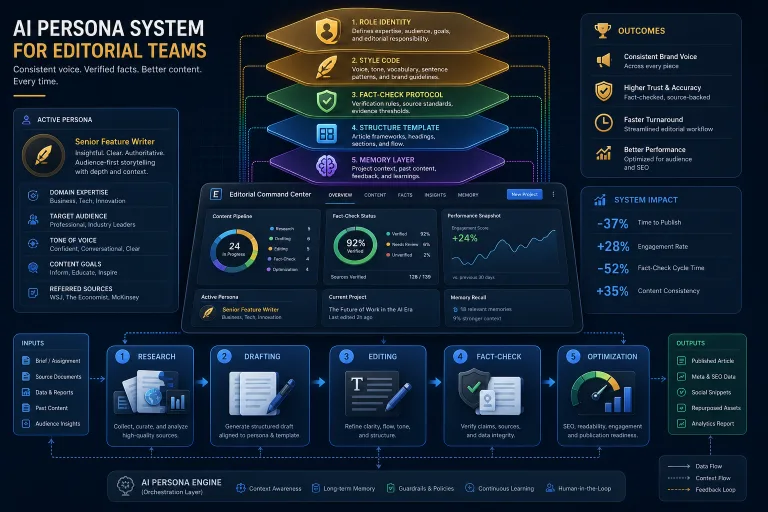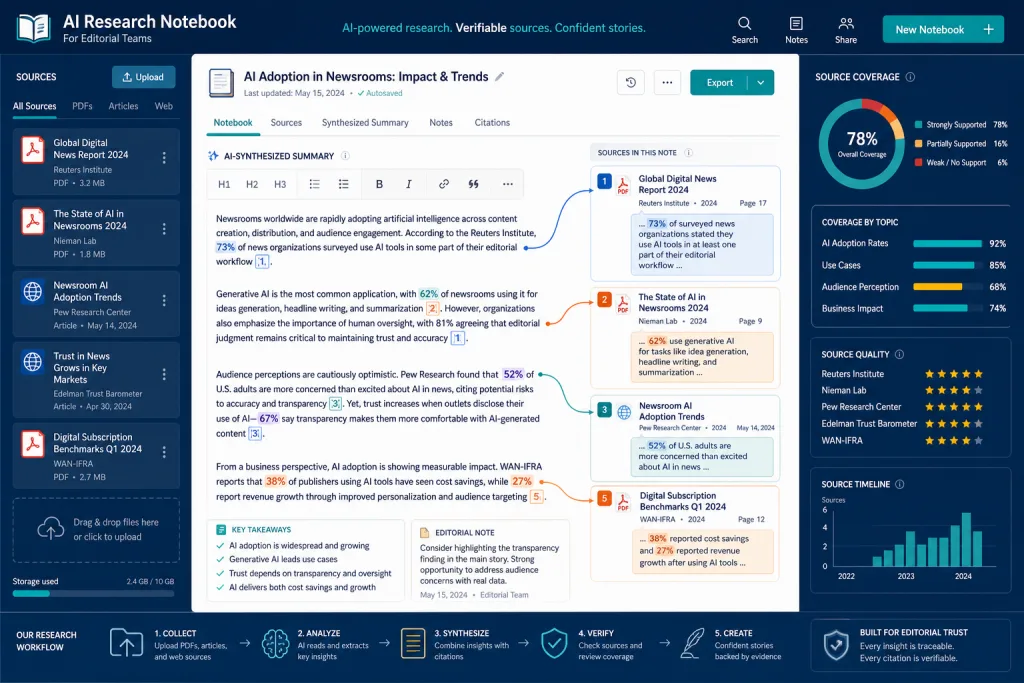
AI notebooks are a class of tools that over the past year have evolved from an experimental feature to a working tool for editorial teams. Google’s NotebookLM, OpenNotebook, and several analogs allow you to upload dozens of sources—PDFs, articles, transcripts, internal documents—and work with them via an LLM: ask questions, get summaries, verify quotes, and prepare long-form content drafts tied to specific fragments of the sources. For editorial teams producing longreads, reviews, analytics, and knowledge-base materials, this solves one of the most labor-intensive stages—working with primary materials and fact-checking before and after text generation. Below is what these tools can do, how they compare, and how to integrate them into your editorial pipeline without losing quality or control over data.
What is an AI Notebook and How Does it Differ from a Standard LLM Chat
An AI notebook is a tool where you upload your own sources, and the model works only with them, rather than with the general corpus of training data. The key difference from a chat with ChatGPT or Claude is that answers are tied to specific fragments of the uploaded documents. You can see where each quote comes from and verify it in one click.
For editorial teams, this is critical. When a journalist or content editor prepares an analytical longread, they need not to “invent something on the topic,” but to synthesize information from 15–30 sources: reports, research, interviews, previous publications. A standard LLM chat mixes your sources with the model’s general knowledge—and you cannot separate one from the other. An AI notebook creates a grounded context where every answer can be traced back to a specific paragraph of a specific document.
NotebookLM: Features and Use Cases for Editorial Teams
Google’s NotebookLM is the most famous representative of this class. The main features relevant for content teams:
- Upload up to 50 sources in PDF, Google Docs, URL, text, and YouTube videos with transcription formats. For an editorial team preparing a market review, this is usually enough for one piece.
- Source-bound citation—each fragment of the response contains a link to a specific place in the document. This is a basic fact-checking feature: the editor sees where the statement comes from.
- Content structure generation—NotebookLM can suggest an article structure, a list of key points, or an FAQ based on uploaded sources. Not a final text, but a skeleton that the editor refines.
- Audio Overview—a feature that turns sources into a podcast format. For editorial teams working in multiple formats, this is a way to quickly get an audio version of the material to check logic and coherence.
Limitations: NotebookLM only works with Google models. You cannot choose a different LLM if you are not satisfied with the quality or language. For Russian-language content, this can be a problem—the generation quality in Russian by Gemini is noticeably lower than by Claude or GPT-4.
OpenNotebook: An Open-Source Alternative with Model Choice
OpenNotebook is an open-source tool that solves the main limitation of NotebookLM: you choose which LLM to use. You can connect GPT-4, Claude, Mistral, or even a local model via API. For editorial teams, this means three important things.
First, generation quality control. If you work with Russian-language content, you can test several models and choose the one that best handles your type of materials—technical reviews, legal analytical articles, or marketing content.
Second, privacy. OpenNotebook can be run locally or on your own server. Sources do not leave your infrastructure. For editorial teams working with confidential materials—internal reports, unpublished research, client data—this is a critical requirement.
Third, cost. You pay for model API calls, not for a platform subscription. With large volumes of work with sources (for example, an editorial team of 10 people, each preparing 3–4 materials per week), the difference can be significant.
The flip side: OpenNotebook requires technical setup. Connecting API keys, choosing a model, setting up local deployment—these are tasks for an engineer or a tech-savvy editor. NotebookLM works “out of the box,” OpenNotebook does not.
Other Tools: A Brief Market Overview
In addition to NotebookLM and OpenNotebook, the market has several tools that solve related tasks:
- Claude Projects (Anthropic)—allows you to upload up to 200K tokens of context and work with it as a single source. There is no such convenient fragment-by-fragment citation, but the generation quality in Russian is higher.
- Custom GPTs (OpenAI)—you can upload files and configure a system prompt, but citation works worse than in NotebookLM.
- Perplexity Pro—not a notebook in its purest form, but allows you to upload files and work with them alongside web search. Useful for editorial teams that need a combination of their own sources and up-to-date data from the web.
The choice depends on the specific task: for deep work with sources and fact-checking, NotebookLM and OpenNotebook currently lead.
Criteria for Choosing an AI Notebook for an Editorial Team
When choosing a tool for your editorial pipeline, evaluate six parameters:
- Citation quality—how accurately the tool references specific fragments of sources and whether each quote can be verified in one click.
- Russian language support—if your editorial team works in Russian, test generation and analysis on real materials, not on demo examples.
- Privacy and data control—where sources are stored, who has access to them, and whether local deployment is possible.
- Context limits—how many sources and of what volume can be uploaded. For longreads with 30+ sources, a limit of 50 documents might be critical.
- Integration into the existing stack—whether the tool can be connected to your CMS, editorial calendar, or knowledge management system.
- Cost at scale—calculate expenses for 5, 10, and 20 editors. A platform subscription might be cheaper than API calls, or vice versa.
Workflow: From Sources to Draft
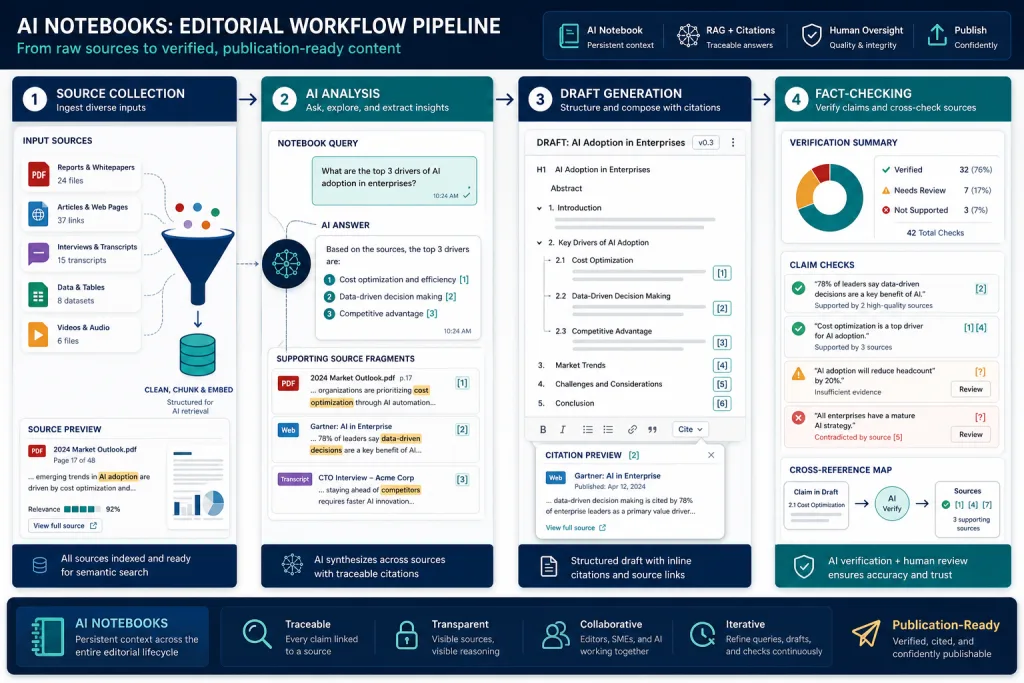
Here is what a typical workflow with an AI notebook in an editorial team looks like:
Step 1. Gathering sources. The editor or journalist collects primary materials: research, reports, previous publications, interview transcripts. The sources are uploaded to the notebook.
Step 2. Initial analysis. The editor asks questions: “What are the key conclusions from these sources?”, “Where do the sources contradict each other?”, “What data is outdated?”. The AI notebook answers with quotes, the editor verifies.
Step 3. Structuring. Based on the analysis, the editor asks the tool to suggest an article structure: sections, argumentation logic, placement for data and quotes. The structure is refined manually.
Step 4. Draft generation. The editor tasks the tool with writing a specific section, relying only on the uploaded sources. The draft contains quotes with links to the sources.
Step 5. Fact-checking and editing. The editor checks every quote, compares it with the original, adds missing data, and rewrites formulations. The AI notebook is used for verification: “Is there data in the sources that supports this statement?”
This process does not replace the editor. It speeds up routine stages—searching, summarizing, initial structuring—and leaves more time for analysis, interpretation, and style work.
Privacy and Data Management
For editorial teams, privacy is not an abstract requirement, but an operational necessity. If you upload an unpublished report, an exclusive interview, or internal company data to NotebookLM, you must understand who has access to them.
NotebookLM uses sources to generate responses within a specific notebook, but Google may use the data to improve services in accordance with its privacy policy. For public sources (published research, articles), this is acceptable. For confidential ones, it is not.
OpenNotebook with local deployment solves this problem completely: data does not leave your server. But it adds responsibility for infrastructure: backups, updates, access security.
Rule of thumb: if the source is already published, NotebookLM is sufficient. If the material is confidential, use local deployment of OpenNotebook or an analog.
Integration into the Editorial Pipeline
An AI notebook should not be a standalone tool that an editor uses occasionally. Maximum efficiency is achieved when it is integrated into the editorial process as a mandatory stage.
For example, in a longread production pipeline, three integration points can be identified:
- Briefing—at the stage of gathering sources, the editor uploads them to the notebook and gets an initial analysis: is there enough data, where are the gaps, which sources contradict each other. This helps decide whether the material is ready to work on.
- Draft—the notebook is used to generate the first draft with quotes. The editor works not with a blank page, but with a structured text tied to sources.
- Fact-checking—before publication, the editor runs the final text through the notebook, checking that every statement is supported by the uploaded sources.
Such integration reduces longread production time by 30–40%—not by speeding up writing, but by eliminating manual searching and cross-referencing of sources.
Risks and Limitations
AI notebooks are a powerful tool, but they are not without risks that need to be considered when implementing:
Hallucinations within sources. Even when the model works only with uploaded documents, it can misinterpret data—especially if the source contains tables, graphs, or complex terminology. Citation helps detect the error, but does not prevent it.
False sense of confidence. When every answer is accompanied by a link to a source, an illusion of reliability arises. The editor may start trusting answers without verification. The fact-checking process must remain mandatory, regardless of how convincing the citation looks.
Dependency on a single tool. If the entire source-handling pipeline is tied to one tool, a failure or policy change (e.g., limiting limits or changing the model) can halt the work. Have a backup plan.
Cost at scale. API calls for large volumes of sources can cost more than it seems at first glance. Test on real tasks and calculate the cost for a monthly volume.
Checklist: Implementing an AI Notebook in an Editorial Team
- Identify the types of materials where the notebook gives the maximum time savings (usually analytics, reviews, longreads with a large number of sources)
- Test 2–3 tools on the same set of sources and compare citation and generation quality in Russian
- Draft a policy: which sources can be uploaded to a cloud tool, and which only to a local deployment
- Define integration points in the editorial pipeline: briefing, draft, fact-checking
- Document the workflow: prompts, sequence of steps, verification criteria—so any editor can replicate it
- Appoint a person responsible for monitoring API costs and platform limits
A Practical View: When Implementation Pays Off
For media teams and content departments producing 10+ long materials per month using 15+ sources for each, an AI notebook pays off in 4–6 weeks. The main savings are not in writing hours, but in hours spent searching, reading, and cross-referencing sources. An editor who previously spent 6–8 hours working with sources for one longread spends 2–3 hours with an AI notebook. The freed-up time goes to analysis, interviews, and editing—things that directly affect quality.
For small editorial teams (2–3 materials per month), implementation might not pay off: setup and training costs exceed the savings. In this case, it is easier to use NotebookLM for free for individual tasks without building a full-fledged pipeline.
FAQ
How does NotebookLM differ from a standard chat with ChatGPT or Claude?
NotebookLM works only with the sources you upload and cites specific fragments of documents. A standard LLM chat mixes your data with the model’s general knowledge, and you cannot separate one from the other. For fact-checking and working with sources, this is a critical difference.
Can NotebookLM be used for confidential materials?
Not recommended. NotebookLM is a Google cloud service, and the data is processed on the company’s servers. For confidential sources, use OpenNotebook with local deployment or similar open-source solutions where data does not leave your infrastructure.
Which AI notebook is better for Russian-language content?
NotebookLM runs on Gemini models, the generation quality in Russian is lower than that of Claude or GPT-4. OpenNotebook allows you to choose a model—for Russian, it is worth testing Claude and GPT-4. Conduct a test on your editorial team’s real materials, not on demo examples.
Does an AI notebook replace an editor or fact-checker?
No. An AI notebook speeds up routine stages—searching, summarizing, initial structuring—but does not replace editorial judgment, interpretation, and final verification. Citation helps detect errors, but does not prevent them. Human fact-checking remains mandatory.
How many sources can be uploaded to NotebookLM?
Up to 50 sources per notebook. For most longreads, this is enough, but for massive reviews with 30+ sources, the limit might be tight. In OpenNotebook, the limit depends on the chosen model and its context window.