Conversational video editing is an approach where a content team edits AI-generated video not by regenerating from scratch, but through a sequence of natural-language instructions. Each edit builds on top of the previous one, preserving the scene’s context: objects, lighting, camera movement, character actions. Google DeepMind describes this experience as “Nano Banana, but for video” — when you ask it to change the environment, adjust an object, or refine an action, the model doesn’t discard what’s already been created; it modifies it meaningfully.
For content teams, this means a fundamental shift in workflow. Previously, the cycle of “prompt → generate → evaluate → regenerate” was repeated dozens of times, and each iteration could completely change the visual output. Now, the editor works with video as a living material: gives refinements, rolls back unsuccessful edits, tests variations — all without leaving a single session. This cuts production time, but simultaneously demands new skills: the ability to articulate directorial instructions, manage context, and maintain consistency at every step.
In this article, we’ll break down how conversational editing fits into a content team’s production pipeline — from storyboarding to final assembly, localization, and distribution.
What Is Conversational Video Editing
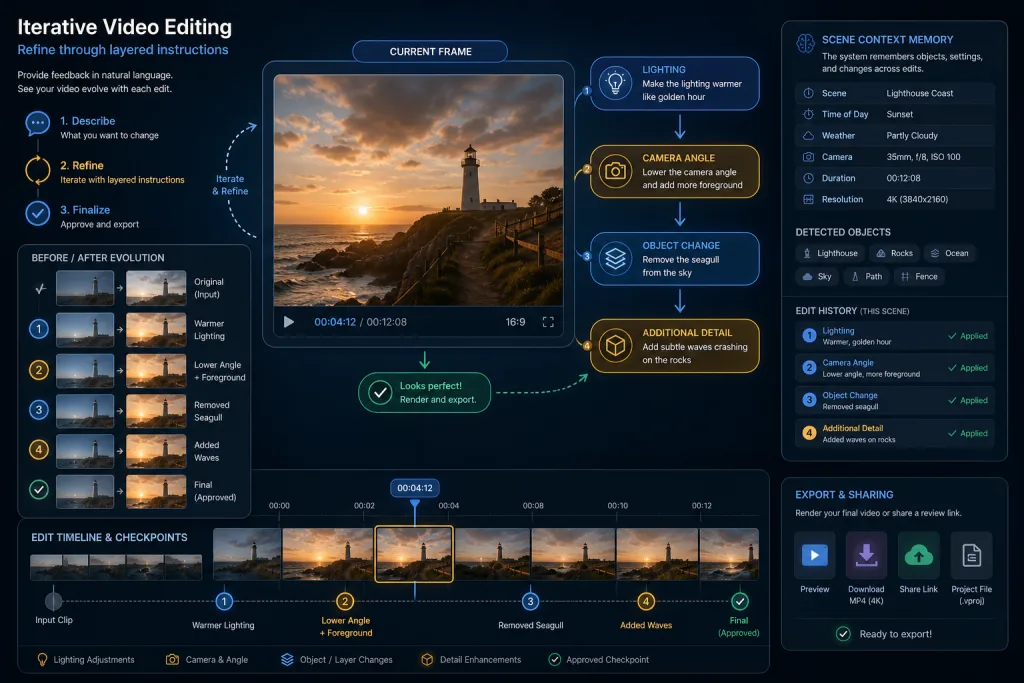
Conversational video editing is an interactive mode of working with an AI video model, in which the user gives sequential natural-language instructions and the model applies them to an existing frame or scene while maintaining continuity of visual and semantic elements.
Key differences from traditional generation:
- Cumulative edits instead of regeneration. You don’t write a new prompt from scratch — you refine: “make the lighting warmer,” “pan the camera left,” “replace the background with an office.” The model understands what to change and what to leave untouched.
- Scene context preservation. The model retains objects, their positions, relationships, and actions in memory. This solves the main pain point of early generative video — unpredictable changes with every new generation.
- Multimodal input. Gemini Omni Flash accepts text, images, audio, and video as references. You can upload a screenshot, say “make it look like this,” and continue refining with words.
For content teams, this means video becomes not a “generated artifact” but an “editable object” — something you can work with just like text in a document editor.
How Gemini Omni and Veo 3 Work Together
Gemini Omni is a multimodal model that processes and generates content from multiple input types: text, images, audio, video. Its first implementation — Gemini Omni Flash — specializes in fast processing of multimodal references and dialog-driven editing.
Veo 3 is Google’s video generation model that works in tandem with Gemini Omni. While Veo handles the quality and detail of generated frames, Gemini Omni provides the dialog-based control interface: it receives instructions, interprets them, and directs changes to the appropriate parts of the scene.
A practical scenario for a content team:
- The director describes the initial scene: “Corporate office, morning light, close-up of a laptop on a desk.”
- Veo 3 generates the first frame.
- The director gives a refinement: “Add a coffee cup to the right of the laptop, make the light slightly warmer.”
- The model applies both edits while preserving the rest of the composition.
- The next instruction: “Slow camera push-in toward the laptop screen” — and the model animates the movement without recreating the objects.
Each step builds on the previous one. This is fundamentally different from the “write a prompt → get a result → don’t like it → start over” approach.
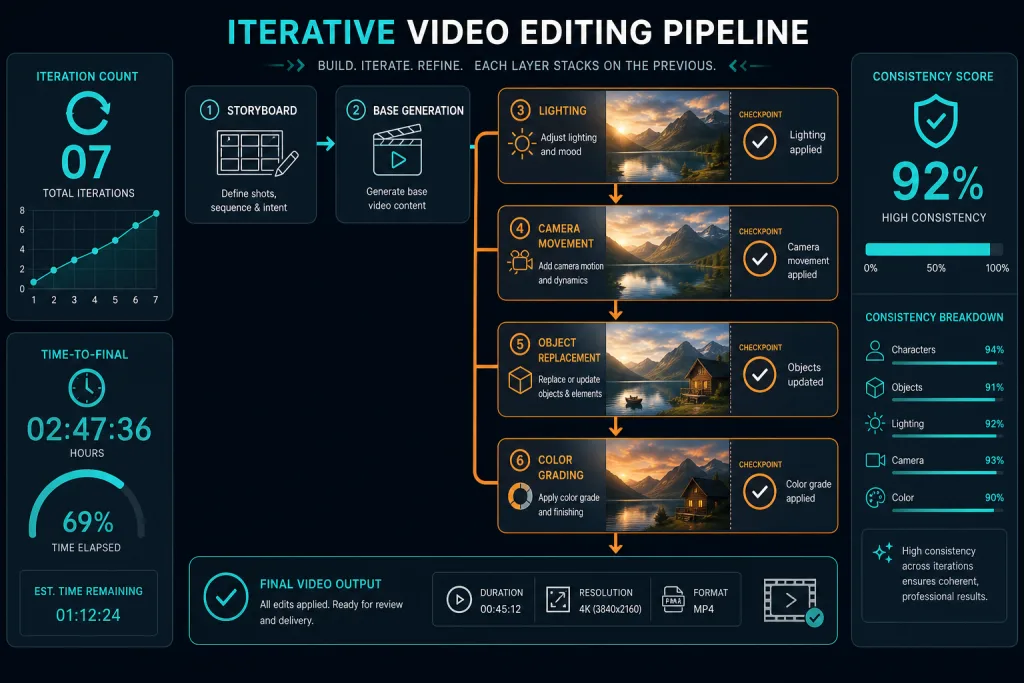
Workflow Shift: From Regeneration to Iterative Editing
The traditional AI video workflow looks like this: prompt → generation → evaluation → new prompt → new generation. Each iteration is a lottery. You might get a better frame but lose a successful element from the previous version. Content teams compensated for this with manual editing: picking the best fragments from dozens of generations and stitching them together.
Conversational editing changes the equation:
- Generation becomes a starting point, not the finish line. The first frame is a draft that will be refined.
- Edits are targeted, not global. You change a specific element without affecting the rest.
- The edit cycle is shorter. Instead of 15–20 regenerations — 5–7 refining instructions.
- Consistency control is higher. The model remembers what came before and doesn’t “forget” objects between edits.
For production teams, this means rethinking roles. The director becomes more of a “dialogue cinematographer” — their job isn’t to write the perfect prompt on the first try, but to guide the scene through a sequence of refinements.
Practical Scenarios for Content Teams
YouTube Explainers and Educational Videos
A team creates an explainer video about a new product. The initial generation is an abstract scene with an interface. Through conversational instructions:
- “Replace the interface with a screenshot of our product” (an image is uploaded as a reference).
- “Add an arrow pointer to the checkout button.”
- “Blur the background so the focus stays on the interface.”
- “Slow down the arrow animation by half.”
Each edit preserves the previous composition. The result is a customized explainer without needing to regenerate everything for each change.
Short-Form Content for Social Media
For Shorts and Reels, speed is critical. Conversational editing allows you to:
- Generate a base 15-second clip.
- Refine: “Add a text overlay with the headline in the upper third.”
- “Change the color palette to something more contrasting.”
- “Make the transition between scenes sharper.”
Instead of manual editing in a video editor — a sequence of instructions that the model applies directly.
Ad Creatives
For A/B testing ad videos, conversational editing opens up a new level of variability:
- Base frame — product on a neutral background.
- Variant A: “Warm lighting, cozy atmosphere.”
- Variant B: “Cool lighting, tech-forward look.”
- Variant C: “Daylight, natural setting.”
All three variants are built on the same base scene — only the environment changes. This cuts variant production time from hours to minutes.
Integration into the Content Pipeline
Conversational editing doesn’t exist in a vacuum. For it to work in a production pipeline, content teams need to establish several levels of integration.
Connecting to Storyboard and Script
The initial generation should be based on a prepared script and storyboard. The team writes the structure of the video — scenes, key frames, duration — and feeds it as the starting prompt. Subsequent edits refine the details of each scene.
Recommended script format for conversational editing:
- Scene 1: description, key objects, camera movement.
- Scene 2: description, transition from Scene 1.
- Scene 3: description, final frame.
Each scene is generated and refined separately, but the model can maintain context across scenes — for example, keeping the product design consistent in all shots.
Connecting to Text Content
For editorial teams that produce both an article and a video simultaneously, conversational editing creates an opportunity for synchronization. The article text becomes the basis for the video script. AI tools can transform key points from the article into instructions for video generation:
- “Show the diagram from Section 2 of the article.”
- “Add the expert quote as a text overlay.”
- “Generate a visual metaphor for the concept from Section 4.”
This ties written and video content into a single pipeline rather than two parallel processes.
Quality and Originality Management
Conversational editing solves one problem but creates others. As edits accumulate, there’s a risk of “scene drift” — a gradual deviation from the original intent. The model may introduce unplanned changes, especially after 5–7 iterations.
Drift Control
Practices to reduce the risk:
- Checkpoints. After every 2–3 edits, save a version of the scene. If drift becomes noticeable, roll back to the checkpoint.
- Scene checklist. Before starting edits, lock down the key elements that shouldn’t change: objects, color palette, style.
- Parallel branches. If you need to test a radical change, create a separate branch from the base scene rather than continuing in the same session.
Originality and AI Detection
Iteratively edited video is still AI-generated content. Platforms may require disclosure. Teams need to:
- Maintain an edit log: what instructions were given, at which step.
- Document human decisions: why a particular edit was chosen.
- Follow platform policies: YouTube and other platforms are tightening requirements for AI content labeling.
Localization and Dubbing in a Conversational Workflow
Conversational editing opens up new possibilities for multilingual video adaptation. Instead of generating separate versions for each language, a team can:
- Create a base scene in the original language.
- Through conversational instructions, replace text overlays with translated versions.
- Use AI dubbing (e.g., Speechify Studio or similar tools) to create a voice track in the target language.
- Refine timing and synchronization through instructions: “Shift the voice track 0.5 seconds later.”
Emotional tags in AI voiceover allow you to control intonation: “make the tone more energetic for the Spanish version” or “soften the intonation for the Japanese version.” This is especially important for ad creatives, where cultural adaptation of tone is just as important as translating the words.
For content teams scaling across 10+ languages, conversational editing cuts the localization cycle from days to hours — provided the pipeline is automated and quality control is built into every step.
Measurable Results and Metrics
How do you evaluate whether conversational editing actually improves production? Key metrics:
- Number of iterations to final frame. A drop from 15–20 (regeneration) to 5–7 (conversational editing) is a realistic benchmark.
- Scene production time. From first prompt to approved frame. Expected reduction — 40–60%.
- Share of usable frames. The percentage of generations that make it into the final cut. With a conversational approach, this is higher because each edit refines rather than replaces.
- Consistency across scenes. The share of scenes where key elements (product, branding, style) are preserved without manual correction.
Teams should integrate tracking of these metrics into their production dashboard to objectively compare the conversational approach with the traditional one.
Risks and Limitations
Conversational editing isn’t a silver bullet. Key limitations at the current stage:
- Scene length. Models still work better with short clips (5–15 seconds). Long scenes with many edits can lose consistency.
- Complex interactions. If a scene involves multiple interacting objects (e.g., a dialogue between two characters), conversational edits can produce unpredictable results.
- Dependence on initial prompt quality. The more precise the initial description, the fewer edits are needed. A weak starting prompt leads to a long chain of refinements.
- Token costs. Each edit is a call to the model. With a large number of iterations, costs can add up, though overall they’re typically lower than full regenerations.
The Future: From Conversational Editing to Agentic Production
Conversational editing is an intermediate step toward fuller automation. The next stage is agentic systems that don’t just execute instructions but propose edits themselves: “I noticed the lighting in Scene 2 doesn’t match Scene 1 — would you like me to align them?”
For content teams, this means the workflow will move from “human instructs the model” to “human and model co-direct the scene.” The editor’s role shifts from instruction operator to quality curator — evaluating proposals, choosing direction, and controlling brand consistency.
Teams that want to be ready should start practicing conversational editing skills now — articulating directorial instructions, managing scene context, and maintaining edit logs. These are foundational competencies that will be in demand regardless of which specific model dominates a year from now.
Checklist: Implementing Conversational Editing in Production
- Lock down the starting script and storyboard before the first generation — the more precise the start, the fewer edits needed
- Identify immutable scene elements (product, branding, palette) and keep them in a checklist before each edit
- Set checkpoints every 2–3 edits and save versions for rollback
- Maintain an instruction log: what you asked to change, at which step, and what result you got
- Limit edit session length to 5–7 iterations — after that, start a new branch from the base scene
- Integrate localization and dubbing into the same conversational pipeline, not as a separate process
- Track metrics: number of iterations, time to final, share of usable frames
FAQ
How is conversational editing different from regular AI video generation?
With regular generation, each new prompt creates a video from scratch — the previous result isn’t taken into account. Conversational editing accumulates edits: the model remembers the scene context and applies changes precisely, without recreating everything from scratch.
What types of video are best suited for conversational editing?
Short formats — explainers, ad creatives, social media (Shorts, Reels). The shorter the scene and the fewer complex interactions, the more predictable the result. Long scenes with many objects require a more cautious approach and frequent checkpoints.
Do I need to label video created through conversational editing as AI content?
Yes. Iteratively edited video is AI-generated content. Platforms like YouTube are tightening requirements for AI disclosure. Maintain an edit log and follow the policies of the platforms where you publish.
Can conversational editing be used to localize video into multiple languages?
Yes. The base scene is created in the original language, then text overlays are replaced through conversational instructions, and AI dubbing adds a voice track in the target language. Emotional tags allow you to adapt intonation to cultural nuances.
How many edits can you make in a single session before quality degrades?
A rough benchmark is 5–7 iterations. After that, the risk of “scene drift” increases. It’s recommended to create checkpoints every 2–3 edits and, if necessary, start a new branch from the base scene.