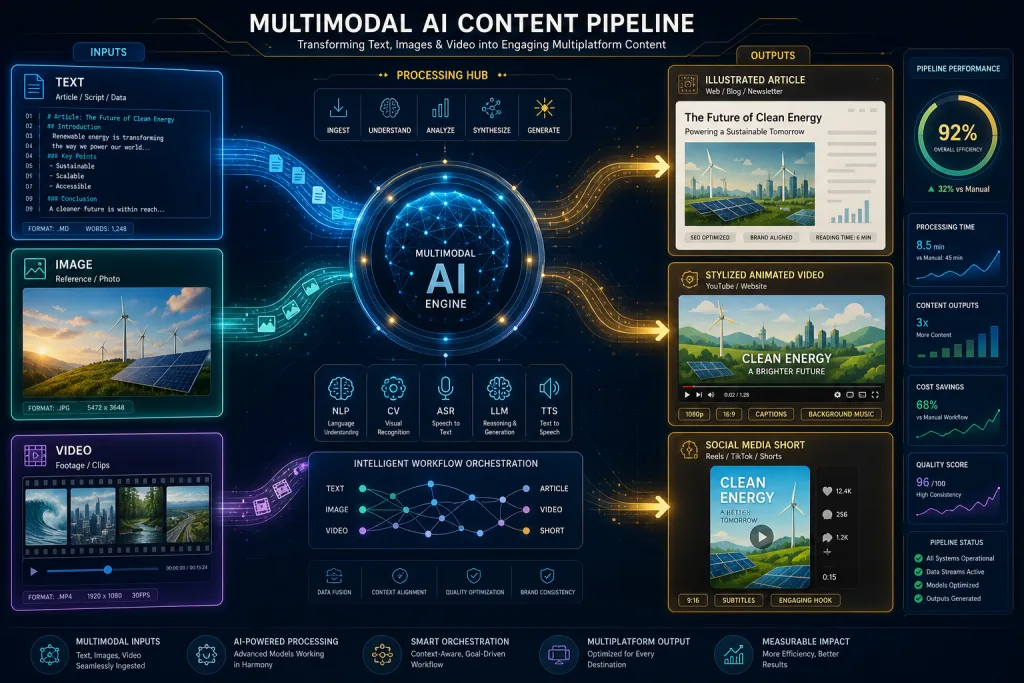
Multimodal AI is not a new model — it’s a new type of production workflow. Content teams used to move between tools the way factory parts move between workstations: one generated images, another wrote copy, a third animated stills. Between steps, you had to download files, rewrite prompts, and accept the loss of creative decisions. Today, multimodal systems are beginning to link these steps: a creator can feed in a written description, a reference image, and a clip sample, then use each input to steer a new visual sequence.
For editorial and video teams, this doesn’t mean a “better generator” — it means a different operating model. Instead of a linear “text → image → video” pipeline, you get a connected environment where modalities act as mutual control signals. This lowers the cost of a blank page and shifts where editorial judgment is needed in the process.
What Multimodal AI Means in a Production Context
In content production, multimodality means a single system can accept and process several input types at once — text, image, video clip, audio — and generate output in any of those modalities. The key difference from earlier generative tools isn’t output quality; it’s step-to-step continuity.
Early tools were narrow by design. One produced images, another wrote copy, a third animated stills. Moving a concept between them meant losing context: a prompt that worked in a text generator didn’t guarantee the same visual result in an image tool. Multimodal systems solve exactly this problem — not by improving each individual step, but by preserving creative intent between steps.
The Reassembly Problem: Why a Linear Pipeline Loses Decisions
The linear “text → image → video” pipeline works, but it’s expensive in lost decisions. When an editor describes a scene in text, the image generator interprets the description in its own way. When an animator takes the generated image into a video tool, the visual style may not carry over. At every handoff, the team faces a compromise: either rewrite the prompt for the new tool, or accept a result that doesn’t match the original intent.
In professional practice, this means concept development that should take hours stretches into days because of the need to “translate” creative decisions between formats. For short formats — Shorts, Reels, ad teasers — this is critical, because the relevance window is short and the number of variants to test is large.
Image-to-Image as a Control Method
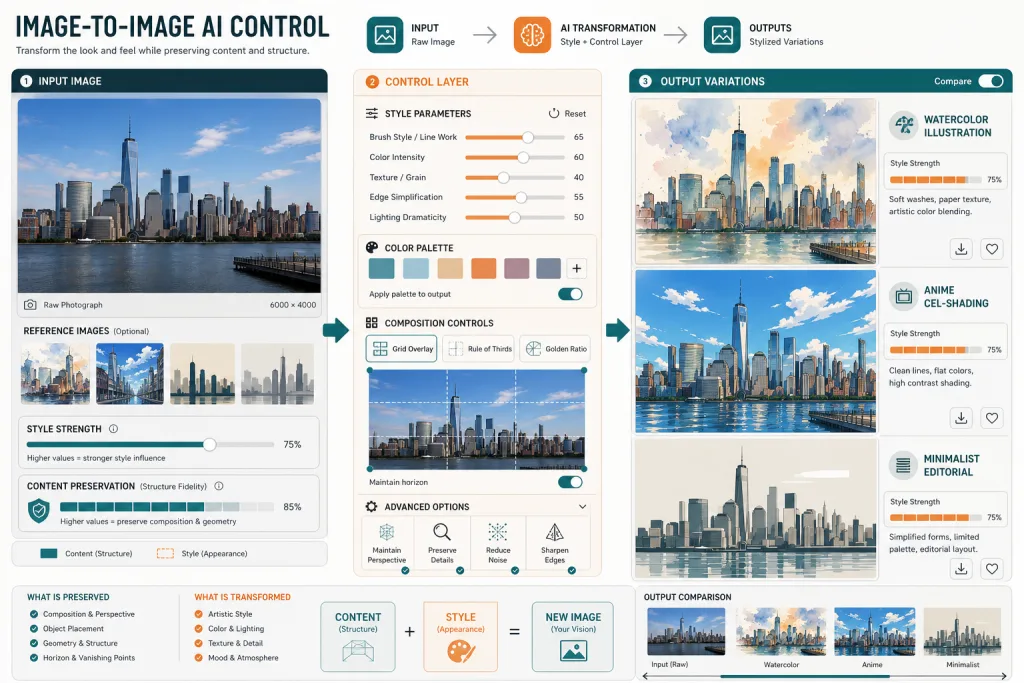
Text prompts were an important first step — they opened the door to a new creative medium. But for visual thinkers, text is an unnatural control language. Image-to-image AI changes the interaction model: instead of describing the result in words, the creator starts with an actual image — a photo, sketch, mockup, screenshot — and transforms it toward the creative goal.
For content teams, this brings three practical advantages. First — control: a reference image carries more information than any prompt, especially when it comes to composition, lighting, and color palette. Second — reproducibility: the same reference yields more predictable results across repeated generations. Third — iteration speed: changing the input image and regenerating is faster than rewriting a prompt and guessing how the model will interpret it.
In an editorial context, image-to-image is especially useful for creating article illustrations where the visual style must match brand guidelines. Instead of describing the style in a prompt, the team can use a reference image as the input signal.
Video Restyling: AI as an Adaptation Tool, Not a Replacement
Discussion of generative video often focuses on whether AI will replace existing production methods. In practice, creators are more likely to combine new tools with the ones they already use. Traditional editing, animation, illustration, visual effects, and sound design remain necessary for projects requiring precise control.
AI-assisted transformation is better understood as another option within a broader process. It helps at the concept development, style testing, content adaptation, and early production stages. Tools like GoEnhance AI let you upload a video, choose or describe a visual direction, and generate an animated version. This doesn’t replace an animator — it gives the team a quick style prototype they can evaluate before investing resources in manual production.
For YouTube teams and short-form producers, this means the ability to test visual styles on early drafts. Ad teams can generate adaptation variants of a single spot for different audiences without a full reshoot. Explainer producers can quickly check which visual approach works best before committing to full production.
A Practical Workflow: From Idea to Video Draft
Let’s look at how a multimodal pipeline works in practice for a content team producing a short explainer video.
Step one — text description. The editor or producer formulates the scene concept: what’s happening, what mood, what pacing. This isn’t a final generator prompt — it’s an editorial brief, similar to what the team would use in traditional production.
Step two — reference image. The designer or producer selects a visual reference: a photo, illustration, or screenshot that sets the composition, lighting, and style. This image becomes the control signal for generation — not a description, but a specific visual anchor.
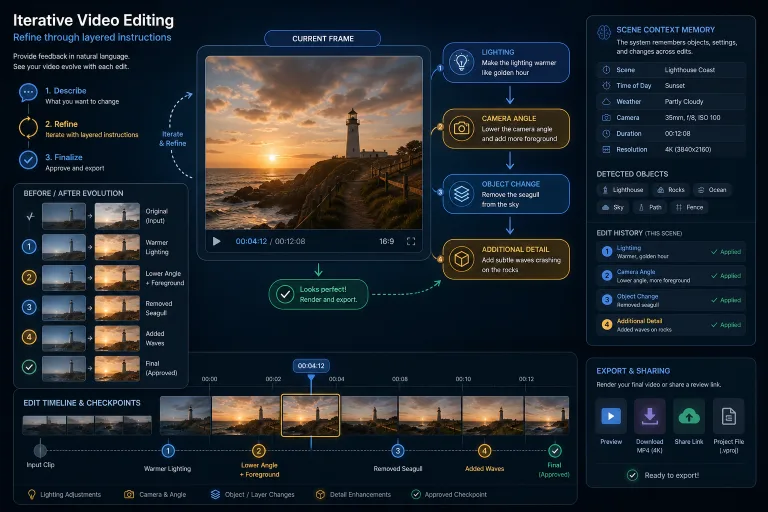
Step three — keyframe generation. The multimodal system uses the text description and reference image to create a set of keyframes for the scene. At this stage, the editor evaluates whether the visual result matches the intent and, if needed, adjusts the inputs — swaps the reference or refines the description.
Step four — video draft generation. From the approved keyframes, the system generates a rough video clip. This isn’t a final product — it’s a draft the team will refine: add sound, titles, localization.
Step five — editing and finalization. A human editor checks consistency, removes artifacts, and adds missing elements. Traditional editing remains necessary for precise control of timing, sound, and transitions.
Where Editorial Control Is Needed
Multimodal AI lowers the barrier to entry for visual production, but it doesn’t eliminate the need for judgment. Results still require evaluation and editing. The question is where in the process editorial judgment adds the most value.
In a linear pipeline, judgment is concentrated at the final edit. In a multimodal one, it’s distributed throughout the process: choosing a reference image is an editorial decision; evaluating keyframes is an editorial decision; deciding which draft is worth refining is also an editorial decision. Teams moving to a multimodal workflow need to restructure roles: the editor becomes a curator of inputs, not just a fixer of outputs.
This is especially important for brand content, where visual consistency is part of brand identity. The team must define which reference images are acceptable as inputs and which are not — just as it defines acceptable tones for text content.
The Tool Landscape: What’s Available Now
Multimodal generation tools are evolving fast, but they can be grouped into several categories by their role in the workflow.
Image-to-image tools — transform existing images along a visual direction. Suitable for creating illustrations, concept art, and adapting visual style.
Video restyling tools — take video as input and generate a version in a different visual style. Useful for concept testing and adapting content to different formats.
Multimodal platforms — combine text, image, and video in a single environment. They reduce losses at step transitions but require more control over the prompt system and input configuration.
Agentic creative systems — move from on-demand generation to autonomous creative processes where an AI agent executes a sequence of steps. Still at an early stage, but the direction is clear: from tool to operating system.
Measurable Results: What to Track
For content teams adopting a multimodal workflow, measurable returns concentrate in a few metrics.
Time from concept to draft — the key indicator. In a traditional pipeline, the path from brief to first video draft can take days or weeks. Multimodal systems compress this to hours, but only if the workflow is set up correctly — without manual reassembly between steps.
Number of tested variants — the second metric. If a team can generate five visual directions instead of one in the same time, the probability of finding a working style goes up. But this only makes sense if there’s a selection process — otherwise the team drowns in variants.
Adaptation cost — the third metric. Adapting a single video for multiple formats, languages, or audiences is a labor-intensive process. AI restyling and multimodal generation reduce adaptation cost, but the quality of adapted versions needs to be checked separately.
Checklist: Adopting a Multimodal Workflow
- Define which input types (text, reference, clip) are acceptable for each content type — and codify this in an editorial guide.
- Build a library of brand-approved reference images to use as control signals for generation.
- Separate roles: input curator, generator, final editor — these are different functions, even if performed by the same person.
- Set a draft selection criterion: how many variants to generate and by which attributes to choose one for refinement.
- Document losses: if a creative decision gets lost at some step, flag that point — it’s a candidate for replacement with multimodal linking.
- Measure concept-to-draft time as the primary workflow efficiency metric, not the number of generated files.
Risks and Limitations
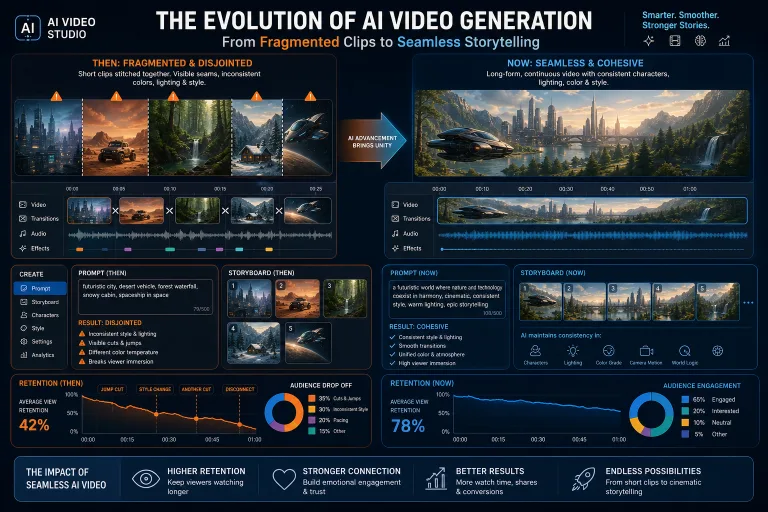
Multimodal AI isn’t a universal solution. First, results require editing — a “raw” output isn’t ready to publish without revision. Second, consistency between scenes in long formats remains a problem: each frame may look good, but together they may not add up to a unified visual narrative. Third, originality: if all teams use the same references and styles, results converge toward the average — a problem already familiar from text AI content.
For editorial teams, this means a multimodal workflow needs the same guardrails as text: originality checks, brand consistency, and fact-checking of visual claims (especially if an image purports to be documentary).
FAQ
How is multimodal AI different from regular image generation?
Multimodal AI accepts several input types at once — text, image, video clip — and uses each as a control signal. Regular generation works with a single input type, usually a text prompt, and doesn’t preserve context between modalities.
Do you need image-to-image if your team already writes good prompts?
Image-to-image gives more control over composition, lighting, and style than a text prompt. For brand content where visual consistency is critical, a reference image is more reliable than a description. But for exploratory generation where the team seeks unexpected results, text prompts remain useful.
Does AI video restyling replace traditional animation?
No. Restyling is a concept-testing and early adaptation tool. For projects requiring precise control over timing, motion, and sound, traditional animation and editing remain necessary. AI speeds up the prototyping stage but doesn’t replace final production.
How do you measure the return from a multimodal workflow?
The primary metric is time from concept to first draft. Additional ones: number of tested visual variants, cost of adapting a single video for multiple formats, and the share of drafts that reach finalization without full regeneration.
What are the risks of everyone using the same references?
Averaging of results. If several teams use the same reference images and styles, visual output becomes indistinguishable. Teams need to maintain their own reference library and update it regularly to avoid the “template content” effect.
What This Means for Content Strategy
Multimodal AI isn’t a point improvement to a tool — it’s a shift in the operating model of content teams. When text, image, and video are linked in a single pipeline, what changes isn’t just speed but the structure of decisions: where the team adds value, where it relies on generation, where the editor intervenes.
For publishers, this means visual content — illustrations, explainer videos, format adaptations — becomes cheaper to produce. But cheap production doesn’t equal valuable output. The teams that will win from multimodal AI are the ones that build a process of curating inputs and editing outputs, not the ones that simply speed up generation. In an era when the blank page is no longer a scarce resource, the scarce resource isn’t creation — it’s judgment.