BioCentury, a biotech publishing company, has launched the first AI connector based on the Model Context Protocol (MCP) — a protocol that allows subscribers to query editorial content directly through Claude or ChatGPT. The connector returns an AI-generated summary of BioCentury’s findings on a topic, followed by a list of relevant articles. This is not a chatbot or a search widget — it’s a software bridge between the editorial archive and a language model, giving the LLM access to the publisher’s content as a structured source.
For content teams, this means a fundamentally new distribution channel. Instead of waiting for an AI assistant to cite your article based on training data or web scraping, you give models direct API access to your content archive. The editorial team transforms from a passive source into an active data provider for AI assistants.
In this article, we’ll break down what MCP means in the context of content operations, how publisher connectors are changing the economics of distribution, and what practical steps a content team needs to take to build its own MCP connector — for both text and video content.
What Is Model Context Protocol and Why Publishers Need It
Model Context Protocol is an open standard introduced by Anthropic in late 2024 that allows external applications to provide context to language models in a standardized way. Simply put: MCP is USB-C for AI. Instead of each model integrating with each source in its own way, MCP defines a single interface through which any MCP-compatible client (Claude Desktop, ChatGPT with pluggable tools, IDE assistants) can request data from any MCP server.
For publishers, this solves a specific problem: content becomes queryable. Today, AI assistants like Perplexity, ChatGPT Search, or Gemini work with what they’ve already indexed or can find on the open web. If your content is behind a paywall, in a closed archive, or simply not optimized for crawling, the model won’t see it. An MCP connector bypasses this limitation: you decide what content to serve, in what format, and with what metadata.
BioCentury showed a working example. Their connector doesn’t query the BCIQ database — only editorial content. A subscriber can ask Claude: “What did BioCentury write about CAR-T therapy in 2025?” — and get a generated summary of the publisher’s findings, not publicly available information from the internet. This is a fundamentally different level of citability: not “the model decided to cite you,” but “you are programmatically present in the model’s response.”
How an MCP Connector Works Technically
An MCP server is a lightweight application that implements three types of primitives: tools (functions the model can call), resources (data the model can read), and prompts (query templates). For a publisher connector, the key primitives are tools and resources.
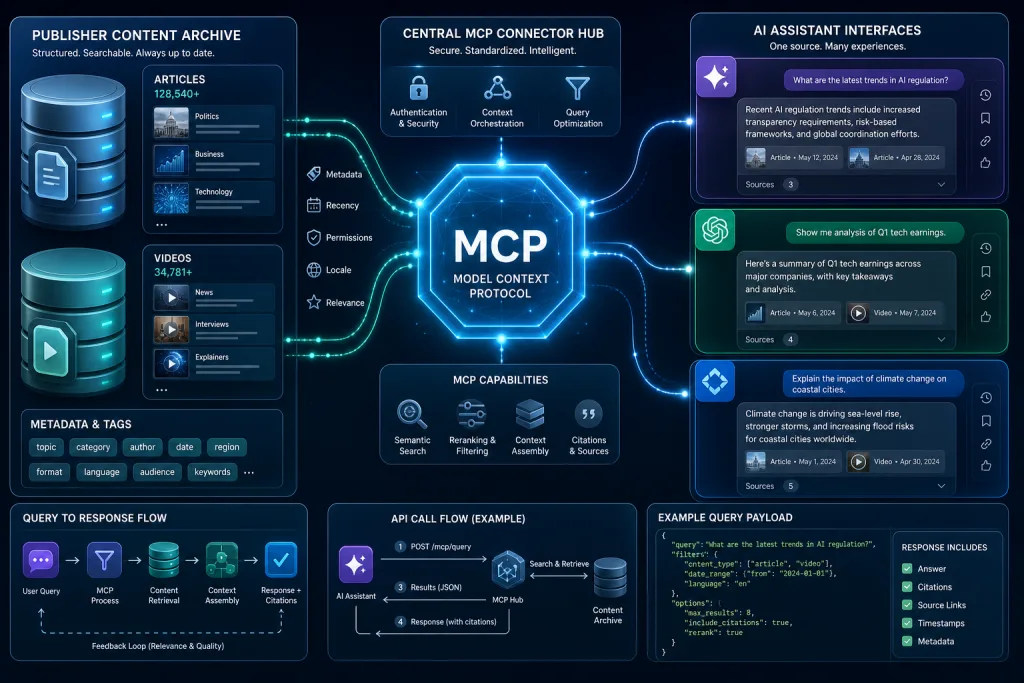
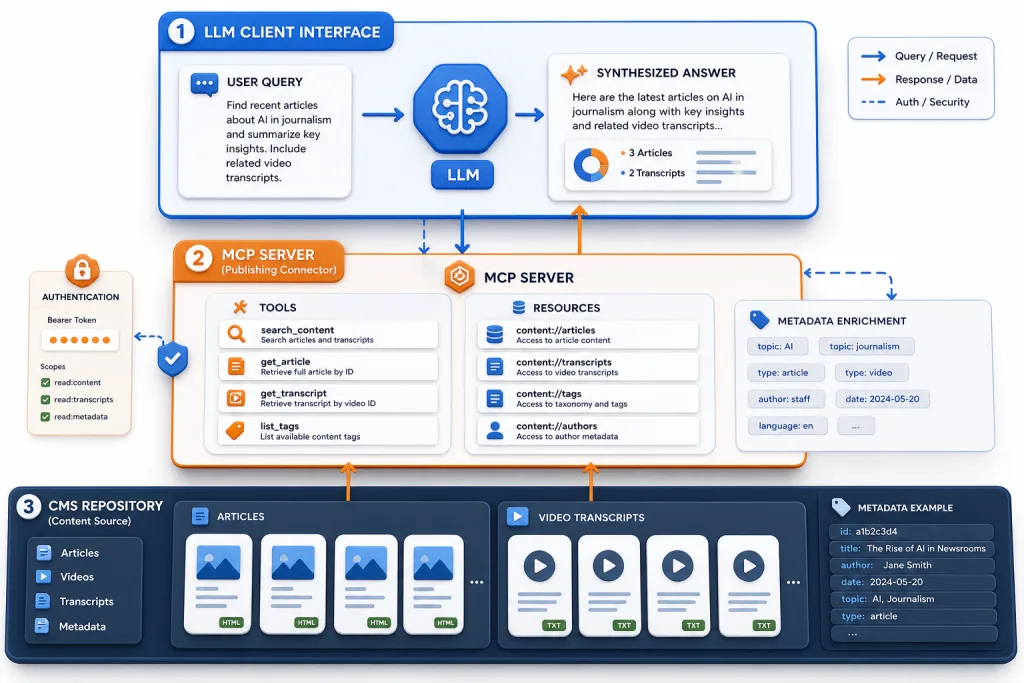
A typical publisher MCP connector architecture looks like this:
- CMS / content repository — the source of truth. Articles, video transcripts, metadata, tags, publication dates.
- MCP server — the middleware layer that receives requests from the LLM client, converts them into CMS queries, and returns results in a format the model can process.
- LLM client — Claude Desktop, ChatGPT, or another MCP-compatible assistant through which the user formulates the query.
When a subscriber asks, “What findings does BioCentury have on liver fibrosis?” the LLM client calls the search_articles tool on the BioCentury MCP server. The server searches the editorial archive and returns headlines, abstracts, and links. The LLM synthesizes an answer based on the returned data and cites the sources.
Why This Changes the Economics of AI Distribution
Existing approaches to AI visibility — LLM SEO, structural optimization, syndication — work with external crawling. The model itself decides what to read and cite. The publisher can influence this process but cannot directly control it.
An MCP connector shifts the balance of power. The publisher decides:
- What content is available — you can open only editorial materials, keeping BCIQ data closed, as BioCentury did.
- In what format — return full texts, abstracts, or structured summaries.
- With what metadata — tags, dates, authors, proof points, expert attributions.
- Under what conditions — subscribers only, with rate limits, with request logging.
This is especially valuable for B2B publishers and niche outlets whose content isn’t crawled at scale. If you write for a narrow professional audience, your articles may not make it into the model’s training data or get indexed by AI search. An MCP connector solves this problem — you connect your archive to the LLM yourself.
Practical Scenarios for Text and Video Teams
For Long-Form Content Teams
If your publication produces analytical articles, reports, or reviews, an MCP connector lets subscribers query your findings on specific topics. Instead of searching the site, the user asks an AI assistant and gets an answer based on your editorial archive. This increases the value of a subscription: content becomes not just readable, but queryable.
BioCentury described the motivation this way: “We used to push content to you. Now you can come to us much more easily.” It’s a shift from push distribution to pull availability.
For Video Teams and YouTube Producers
Video teams can use MCP to provide transcripts, metadata, and timestamps. Imagine a connector that returns not just a text description of a video to the LLM, but structured data: topic, key points, links to sources mentioned in the video. When a user asks Claude, “What CapCut editing tutorials are on this channel?” the connector returns relevant episodes with timestamps.
For channels with educational content, explainers, and tutorials, this opens a new discovery channel — not through YouTube search, but through AI assistants with direct access to your content archive.
For Multilingual Teams
An MCP connector can return content in the language of the query if localized versions are stored in the CMS. This is especially useful for publishers that localize content into 10+ languages with AI: a user asks a question in French, the connector returns the French version of the article, and the LLM synthesizes the answer in French.
How to Build an MCP Connector: Technical Framework
Step 1. Define the Scope of Available Content
Decide what content will be available through the connector. BioCentury opened only editorial content, keeping the database closed. For video teams, this might be transcripts and metadata without access to the original video files. Define the boundaries explicitly — this is both a technical decision and an editorial policy.
Step 2. Design Tools and Resources
A minimal set of tools for a publisher MCP connector:
search_content(query, filters)— full-text search across the archive with filters by date, tag, author.get_article(id)— return a full article or abstract by ID.get_video_transcript(id)— return a video transcript with timestamps.list_topics()— return the taxonomy of topics for which content exists.
Step 3. Implement the MCP Server
The MCP server can be implemented in Python or TypeScript using the official SDKs from Anthropic. The server runs locally (for individual subscribers) or in the cloud (for a SaaS model). The key point is that the server must return data in a format the LLM can efficiently process: structured text with metadata, not HTML pages.
Step 4. Set Up Authentication and Access Control
If the content is paid, the connector must verify the subscription. BioCentury likely uses subscriber tokens to authorize requests. For video teams with closed content, it’s similar: access to premium transcripts only for authorized users.
Step 5. Integrate Metadata and Proof Points
For the LLM to generate high-quality answers based on your content, the returned data should contain not only text but also structured signals: publication date, author, expert attributions, key findings. These are the same proof points needed for citability in AI search, but now they’re transmitted programmatically rather than through web page markup.
Risks and Limitations
Platform dependency. MCP is an Anthropic standard, and for now it’s primarily supported in Claude. ChatGPT and other models may adopt support, but there’s no guarantee the protocol won’t change. The solution is to design the connector so that the search and data-return logic is independent of the MCP layer.
Cannibalization of reading. If the LLM returns a full answer based on your content, the user may not visit the site. BioCentury addresses this by returning a summary of findings plus a list of articles — enough to understand the publication’s position, but not a replacement for full reading. Publishers need to experiment with the granularity of returned data.
Infrastructure costs. An MCP server, a search index across the content archive, and authentication — this is additional infrastructure. For small publishers, it may be overkill. It’s worth starting with a minimal connector: one tool, full-text search, returning abstracts.
Answer quality control. The LLM may misinterpret the returned data or hallucinate over it. Publishers should test the connector on a set of typical queries and check what answers the model generates.
MCP vs. Traditional LLM SEO: Comparing Approaches
| Parameter | LLM SEO / AEO | MCP Connector |
|---|---|---|
| Mechanism | Model crawls the web | Model queries your API |
| Control | Indirect (structure, metadata) | Direct (what to serve, in what format) |
| Access to closed content | No | Yes |
| Freshness | Depends on crawl frequency | Real-time |
| Platform dependency | Low | High (MCP compatibility) |
| Costs | Time spent on optimization | Development and hosting |
An MCP connector doesn’t replace LLM SEO — it complements it. For open content, structural and metadata optimization remains the primary channel for AI visibility. For closed, niche, or fresh content, MCP provides programmatic access that crawling cannot deliver.
Integrating MCP into Content Operations
An MCP connector is not a one-off IT project but part of content operations. It requires maintenance: updating the search index when new materials are published, monitoring answer quality, and managing access. Include the MCP connector in your content pipeline:
- When publishing an article or video — automatically update the connector index.
- When localizing content — add the localized version to the index.
- When archiving or deleting content — synchronously update available resources.
- When changing the taxonomy — update the tools that return the list of topics.
For video teams, this means integrating with the workflow: when an AI tool generates a transcript and subtitles for a new video, the same data automatically goes into the MCP index. When the team localizes a video through AI dubbing, the localized transcripts also become available through the connector.
Checklist: Launching an MCP Connector for Your Publication
- Define the scope: what content (text, transcripts, metadata) will be available through the connector, and what will remain closed.
- Design a minimal set of tools: search_content, get_article, get_video_transcript, list_topics — no more than four at the start.
- Choose an SDK: Python or TypeScript MCP SDK from Anthropic — one language is enough for a quick start.
- Set up authentication: subscriber tokens or API keys to control access to paid content.
- Test on 20–30 typical queries: check what answers the LLM generates based on the returned data, and adjust the granularity.
- Integrate into the content pipeline: automatic index updates on publication, localization, or archiving of materials.
The Future of Publisher APIs for AI
BioCentury plans to support other LLMs besides Claude and ChatGPT. This points to the direction: MCP could become the standard through which publishers connect to any AI assistant. If the protocol gains wide adoption, publishers without a connector will have a harder time competing for attention in the AI environment.
For content teams, this means a new layer in content operations: alongside production, editing, localization, and distribution, there’s now programmatic availability for AI. Content must be not only well-written and well-optimized — it must be queryable. An MCP connector is the mechanism that makes it so.
FAQ
How is an MCP connector different from a regular API?
An MCP connector is a specialized API built on the Model Context Protocol standard, which allows language models to request data in a standardized format. A regular API requires integration with each client separately; MCP provides a single interface for all MCP-compatible LLM assistants.
Can a small publisher use MCP without a development team?
Yes. A minimal MCP server can be deployed in a few days using the official SDKs. To start, one tool (search_content) and a basic search index across articles are enough. The main challenge isn’t development — it’s deciding what content to open up and in what format.
How does MCP work with video content?
An MCP connector can return video transcripts, metadata, timestamps, and descriptions. Video files are not transmitted — only text data that the LLM can process. This makes video content discoverable through AI assistants without needing to watch the video.
Will an MCP connector lead to a drop in site traffic?
The risk exists, but it can be controlled. BioCentury returns a summary of findings plus a list of articles — enough to understand the publication’s position, but not to replace full reading. Publishers should test the granularity of returned data and track click-throughs to the site.
Does MCP support models other than Claude?
MCP is an open standard from Anthropic, but support is growing. BioCentury has already announced plans to support other LLMs. ChatGPT is also introducing support for pluggable tools. However, as of today, Claude Desktop is the primary MCP client.