Content teams are used to working with AI tools as external assistants: an editor copies text into ChatGPT, gets a draft, pastes it back into the CMS, edits it, and sends it for review. In 2026, this pattern is becoming obsolete. Leading CMS platforms — Contentful, Sanity, Storyblok, Strapi — are embedding generative AI directly into the content pipeline through so-called AI Actions: programmable actions triggered within the content management system to automate translation, SEO optimization, brand guideline checks, variation generation, and personalization without switching between tools.
For editorial teams managing long-form content at scale, this means a shift: AI is no longer a separate step but an embedded layer of content operations. In this article — how exactly AI Actions work in CMS, what tasks they solve, what risks they create, and how to build a workflow that maintains editorial control.
What are AI Actions in CMS
AI Actions are programmable triggers within a content management system that call LLMs or other generative models to perform tasks on content objects. Unlike a chat interface where the prompt is written manually each time, AI Actions are pre-configured operations with fixed prompts, context, and output rules.
Contentful, for example, positions AI Actions as a way to “embed generative AI into daily tasks — from translation to SEO and brand governance.” The key difference from external tools is that an AI Action works with the full context of the content model — content types, fields, relationships, tags, localizations. The model “knows” what it is optimizing: a landing page, a knowledge base article, a product description, or an email campaign.
In practice, it looks like this: an editor opens a record in the CMS, selects an action like “Optimize for SEO” or “Translate to German,” and the system applies a pre-configured prompt considering the field structure, brand glossary, and historical edits. The result goes into a draft, not production — human-in-the-loop remains mandatory.
Six Tasks AI Actions Solve Inside a CMS
1. Mass Localization of Long-Form Content
Instead of exporting articles to a translation tool and importing them back, AI Actions trigger translation inside the CMS, taking the content model into account. The “title” field is translated with a length limit, the “meta description” field with SEO requirements in mind, and the article body with preserved markup and embedded media. The brand glossary is loaded automatically.
For editorial teams scaling to 10+ languages, this eliminates the most painful bottleneck: coordination between translators, editors, and the system. The translation goes directly into the required locale, and the locale editor receives a notification for review.
2. Structure-Aware SEO Optimization
An AI Action for SEO analyzes the current record, compares it with target keywords, and suggests changes: term density, heading structure, meta tags, internal links. Unlike Surfer or Clearscope, which operate in a separate interface, the result is applied directly to CMS fields.
Important: an AI Action does not replace on-page audits. It automates routine edits — meta descriptions, alt texts, H2/H3 headings — but strategic decisions about angles and positioning remain with the editor.
3. Brand Governance and Tone of Voice Checks
An AI Action for brand governance checks the draft against the style guide: tone, forbidden phrasing, terminology compliance, sentence length, use of active voice. This isn’t proofreading in the classical sense — it’s a programmable editorial policy applied to all content automatically.
For teams of 20+ writers, this solves the consistency problem: every draft goes through the same check before reaching the editor. The editor receives not “raw” text, but pre-filtered content.
4. Variation Generation and Repurposing
From a single pillar article, an AI Action generates: a shortened version for an email newsletter, a set of cards for social media, an FAQ block, a summary for the internal knowledge base. Each variation is created in a separate CMS field with the correct formatting.
This isn’t just “making five posts from one text” — it’s structured repurposing, where each variation has its own content model, its own length and tone rules.
5. Personalization of Content Experiences
Contentful Personalization, for example, directs visitors to the top-performing versions of content instead of an even split test. An AI Action generates content variations for different audience segments, and the traffic distribution system determines which version works better.
For editorial teams, this means: instead of manually creating three versions of a landing page, the editor creates one, and the AI Action produces variations with different headlines, CTAs, and emphases. The risk is losing a unified brand voice if poorly configured.
6. Content Generation from Structured Data
An AI Action can take data as input — product specs, a comparison table, a set of reviews — and generate a description, overview, or FAQ. For knowledge bases and catalogs, this is especially useful: hundreds of similar pages can be created not manually, but from a template with AI-generated text based on the data.
Architecture of AI Actions: How It Works Technically
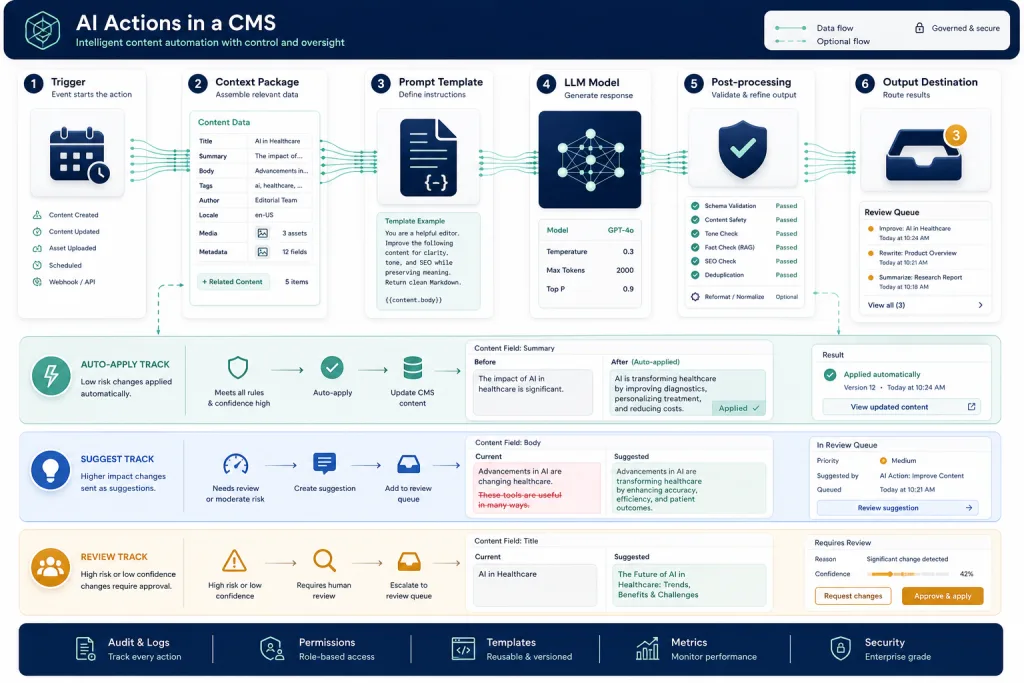
An AI Action in a modern CMS is not a monolithic function, but a chain of several components:
- Trigger — an event in the CMS: record creation, status change, manual launch by an editor, a schedule.
- Context package — the data passed to the model: record fields, related content, glossary, style guide, historical edits, target locale.
- Prompt template — a pre-configured system prompt with variables that injects context. Stored in the CMS, versioned, and reviewed.
- Model — the LLM the Action calls. It can be OpenAI, Anthropic, a local model, or a router between several.
- Post-processing — output validation: checking markup, length limits, compliance with the field schema, filtering forbidden terms.
- Output assignment — where the result goes: into a field draft, into a review queue, into a comment for the editor, or into a separate variation.
Understanding this chain is critical for editorial teams: each component is a control point. If the prompt template isn’t versioned, it’s impossible to track why translation quality dropped. If post-processing doesn’t check markup, the AI can break the article’s HTML structure.
Workflow: How to Embed AI Actions into the Editorial Pipeline
Implementing AI Actions in a CMS isn’t just “turning on a feature,” it’s restructuring the editorial process. The working pattern for long-form content teams:
Stage 1: Audit of repetitive tasks. List all the operations that editors do manually and that repeat from article to article: translating meta descriptions, checking tone, generating summaries, filling in alt texts. These are candidates for AI Actions.
Stage 2: Prompt engineering for each Action. Each Action gets its own system prompt with strict rules: length, structure, forbidden phrasing, mandatory elements. The prompt is tested on 10-15 existing articles, and the result is reviewed by a senior editor.
Stage 3: Split into auto-apply and suggest. Some Actions can be applied automatically (alt texts, meta descriptions), while others only as a suggestion (translating the article body, repurposing). The decision depends on the risk of error and reversibility.
Stage 4: Review queue. All AI-generated changes go into a review queue, not directly to publication. The editor sees a diff — what changed, which Action fired, which prompt was used.
Stage 5: Quality metrics. For each Action, track: the percentage of edits after AI, the time from generation to publication, the frequency of rejections. An Action with >40% edits is a candidate for prompt refinement.
Risks and Limitations
Hallucinations in structured fields. An AI Action generating a meta description might insert non-existent information. For fields with a high cost of error (legal disclaimers, product specs), human-in-the-loop is mandatory.
Prompt drift. When updating models (e.g., moving from GPT-4 to a new version), prompts that worked correctly might start giving different results. You need a regression test suite: 20-30 articles with benchmark outputs that are run on every model update.
Context leakage. An AI Action passes the record’s content to the model. If the CMS is integrated with an external model API, the data leaves the perimeter. For content under NDA or with restrictions, you need an on-premise option or an enterprise contract with a guarantee against using data for training.
False sense of scalability. A team might decide that since AI Actions automate routine, they can increase volume 5x. In practice, the bottleneck shifts: not generation, but review. If there aren’t enough editors, AI Actions create a queue, not content.
Comparison: External AI Tool vs. AI Action in CMS
| Criterion | External tool (ChatGPT, Surfer) | AI Action in CMS |
|---|---|---|
| Context | Only what the editor copied | Fields, relations, locales, glossary |
| Prompt | Manual, unversioned | Pre-configured, versioned |
| Output | Copy-paste back to CMS | Directly to field or review queue |
| Consistency | Depends on the editor | Depends on the prompt template |
| Audit | None | Action log, diff, history |
| Scale | One at a time | Batch operations across portfolio |
This doesn’t mean external tools will disappear. For research, creative drafts, and complex prompts, the chat interface remains preferable. AI Actions win where the task is repeatable, structured, and tied to the content model.
Practice: What to Do Right Now
If your team works in a leading CMS or is planning a migration, assess your readiness for AI Actions across three levels:
Level 1 — Foundation. The content model is clean, fields are typed, locales are configured, the brand glossary is documented. Without this, AI Actions will work with dirty context.
Level 2 — Prompt system. You have documented prompts for repetitive tasks, tested on real content. Prompts are stored in the system, not in employees’ heads.
Level 3 — Review workflow. The review queue is set up, editors see diffs, quality metrics are collected. Without this, AI Actions are just uncontrolled generation.
Checklist: Implementing AI Actions in CMS
- The content model is typed: every field has a clear purpose, format, and length limits
- Brand glossary and style guide are documented and available in a format that can be passed to the prompt
- Every AI Action has a versioned prompt template with a regression test suite
- The split between auto-apply and suggest is defined for each Action based on risk level
- The review queue is configured: the editor sees the diff, the Action source, and the prompt used
- Quality metrics (percentage of edits, rejection rate) are collected for each Action
- Data policy is defined: which fields can be sent to external models, and which cannot
The Future: From AI Actions to Autonomous Content Agents
AI Actions are the first step. The next is autonomous agents that don’t just perform a single action on a trigger, but coordinate a chain: analyze a content gap → create a brief → generate a draft → optimize → translate → send for review. Contentful and similar platforms are moving toward this, but today the practical value lies in properly configured Actions, not autonomy.
Editorial teams that haven’t started yet should begin with one Action: localizing meta descriptions or generating alt texts. These are low-risk tasks with measurable results. Once you have a working pattern, expand to translating article bodies, brand governance, and repurposing.
FAQ
How does an AI Action in a CMS differ from a regular prompt in ChatGPT?
An AI Action works with the full context of the CMS content model — fields, relations, locales, glossary. The prompt is pre-configured and versioned, and the output goes directly into a field or review queue instead of being copied manually. This eliminates context loss and ensures consistency.
Can AI Actions be used without external model APIs?
Yes, if the CMS supports on-premise models or enterprise contracts with a guarantee against using data for training. For content under NDA, this is mandatory. Some CMSs allow routing different Actions to different models — external for low-risk tasks, local for sensitive ones.
What percentage of edits after an AI Action is considered normal?
It depends on the task. For alt text generation — 10-15%, for article body translation — 25-35%, for brand governance — 15-20%. If the edit rate exceeds 40%, the prompt template needs refinement. Regularly review thresholds when updating models.
Does an AI Action in a CMS replace the need for external SEO tools?
No. An AI Action automates applying SEO rules to CMS fields, but strategic on-page audits, competitor analysis, and tracking visibility in AI answers remain the domain of specialized platforms. An AI Action is execution, not strategy.
How do we start implementing if we don’t have a leading CMS?
Start by documenting prompts for repetitive tasks and creating templates in your current tool. When you migrate to a CMS with AI Actions support, you’ll have a ready-made prompt system to port into Action templates. The foundation — a clean content model and glossary — is needed regardless.